Request for Comments: 0006
Category: Experimental
August 2026
9 min read
An AI Keyboard Is a Real-Time System That Happens to Call an LLM
Shipping a third-party iOS keyboard with on-device prediction and a cloud grammar model. Latency budget, platform constraints.
Figure 1: Photo by Oscar Mucyo on Unsplash
Almost all AI Keyboards start from the LLM. Choose a good one, integrate and demo it. This approach is wrong, and iOS tells you about it a few days after real typing.
In my experimental project, I decided to see how it works under the hood and how we can build the best keyboard extension for iOS. And not even just a general keyboard, but the keyboard that deeply understands the context and can improve your text. I couldn’t even imagine how many limitations it has.
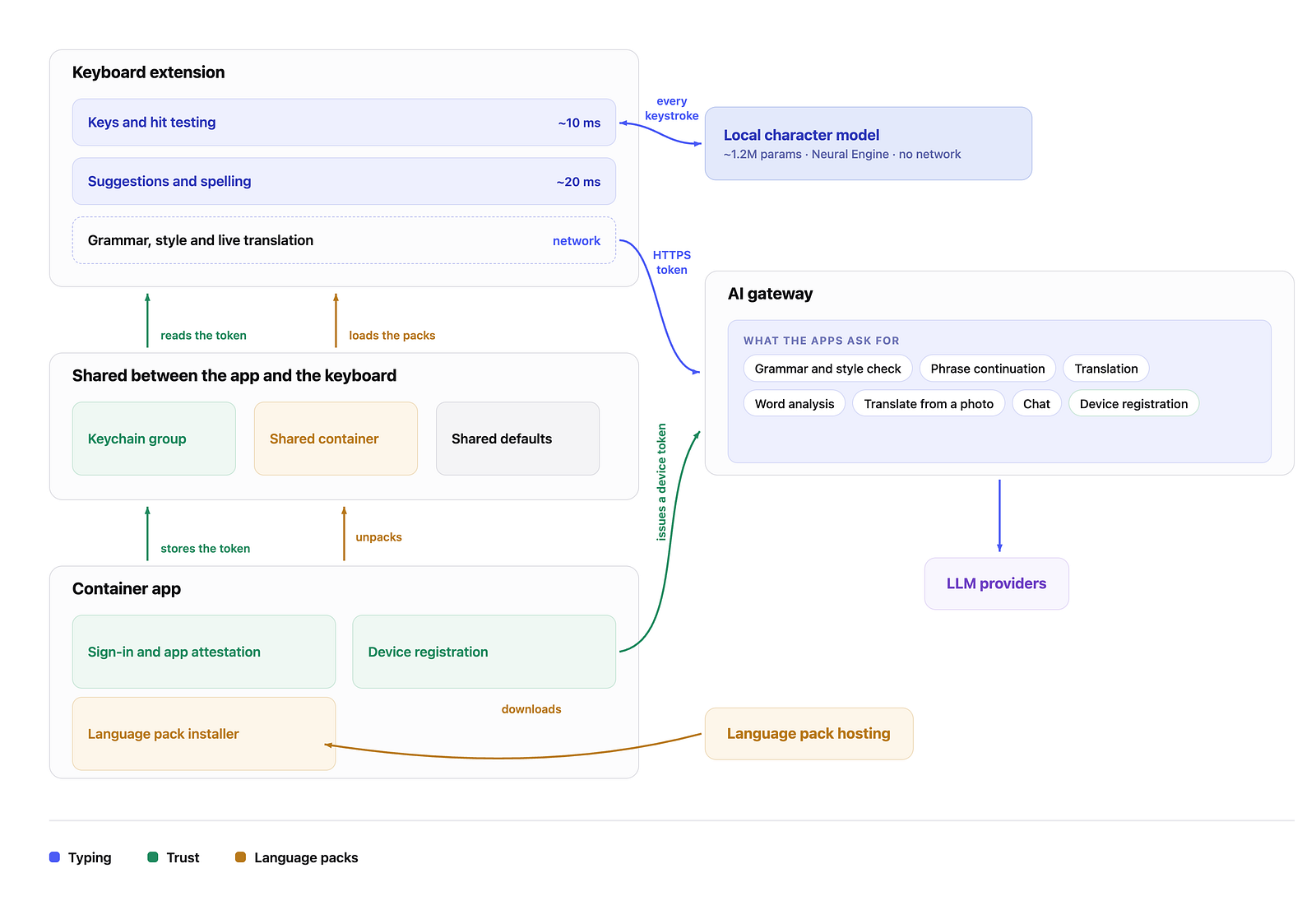
The keyboard should respond right now, without delays. While you are thinking about the current “press button”, a finger moves to the next button. The best practice across different keyboards says that we need to target about 10ms for pressing a button and about 200ms for showing suggestions.
In the current project, I also specified to have 300ms as server LLM latency, and there could be a few seconds’ delay with a bad network connection. As you can see, it is 1000 times more than we allow and no LLM prompt improves it.
That’s why the question is not “which model should we use?” — the right question is “what should be shown immediately and what can be delayed?”
The local model is re-ranking, not generating
The most important decision I made was avoiding a small local LLM to generate anything. In this case, the model doesn’t create any words that don’t exist. The model should re-order only. The dictionary provides candidates and our local LLM sorts them in the best order it can. That’s all I expect from this model.
The model which “generates” can think for an unpredictable time and can make a string that doesn’t exist in any language. The re-ranking operation avoids both of these issues. The list of recommendations is small, and will always be within the budget, and each variant comes from the dictionary. The worst thing that can happen is when the best word is the 3rd and not the 1st one.
A few things surprised me
Character-level VS Word-level Model.
Character-level model shows better results than a word-level model. In languages where word endings change, the dictionary blows up: each form is a separate record, the file size increases, and, anyway, you still don’t get the proper word form. The character-level model does the same, but uses a lot less space. This matches the same output that you can find in scientific literature reports, and was confirmed on my side too.
Two Numbers
I checked two numbers:
- keystrokes saved — how much the suggestions remove
- word prediction rate — how often the right word is in the list
The dictionary for all languages was made from real texts, and after adding our re-ranking model, keystroke savings improved from 28% to 46%, and the word prediction rate was increased from 67% to 91%. Here I should say that it depends very much on how you touch your model. It was a feeling that “the keyboard becomes smarter”, but actually, the keyboard stopped being wrong on simple phrases.
Track both from day one; without them you are tuning on vibes.
Real Device
The benchmarks show the real numbers I could get on a real device only. On the simulator I get 4ms easily, but actually during the real tests on a device, I can see that the operations take much more time. A good approach here would be to never trust numbers that come from a non-real device.
Memory
Memory impacts the architecture more than the LLM. The keyboard extension can consume about 60 MB — far less than any other extension on iOS. But each language file has a size of around 7.6 MB. The limit of 60 MB doesn’t warn you, it kills the process. Usually it happens in the middle of typing. That’s why one language is inside the bundle, and others can be downloaded on demand, with a manifest and SHA-256 checksum.
The checksum is needed not for security, but mostly for cases when downloading fails. On the device, you still have the file with the proper name, but half-downloaded bytes. Next time, when the keyboard is opened, the language file looks like it is fully downloaded, but the extension loads a corrupted model and never knows about it.
Privacy here is our critical thing, not a promise.
Keystroke-level work is on-device, and it should stay there. That isn’t just a policy line in the settings. It is security, and it is latency: keystrokes can’t reach the network in time to be useful anyway.

Figure 2: Photo by Towfiqu barbhuiya on Unsplash
I can say that one of the biggest fears for users about 3rd-party extensions is privacy, and here it is closed by architecture rather than by a disclaimer. To respect privacy even more, users can disable the network connection (keyboard full access) after downloading the necessary model. Obviously, deep checks and meaning can’t work in this case, but it is a trade-off, and here we smoothly move to the next point.
The second point is that I decided not to store any data on our side. All LLMs, AI-providers I work with have an opt-out policy to not use data for their training, analysis, etc. To be honest, it creates and will create some challenges with debugging and issue fixing, but this is an intentional decision I went ahead with.
A question you may have: why not Apple’s on-device foundation models? Genuinely promising, and an obvious candidate to absorb part of this tier — but the language coverage doesn’t yet include all the languages I ship. Also, in the future, current small LLMs will allow me to improve them faster and not wait for the next release from Apple.
Let the network be late and take back its words
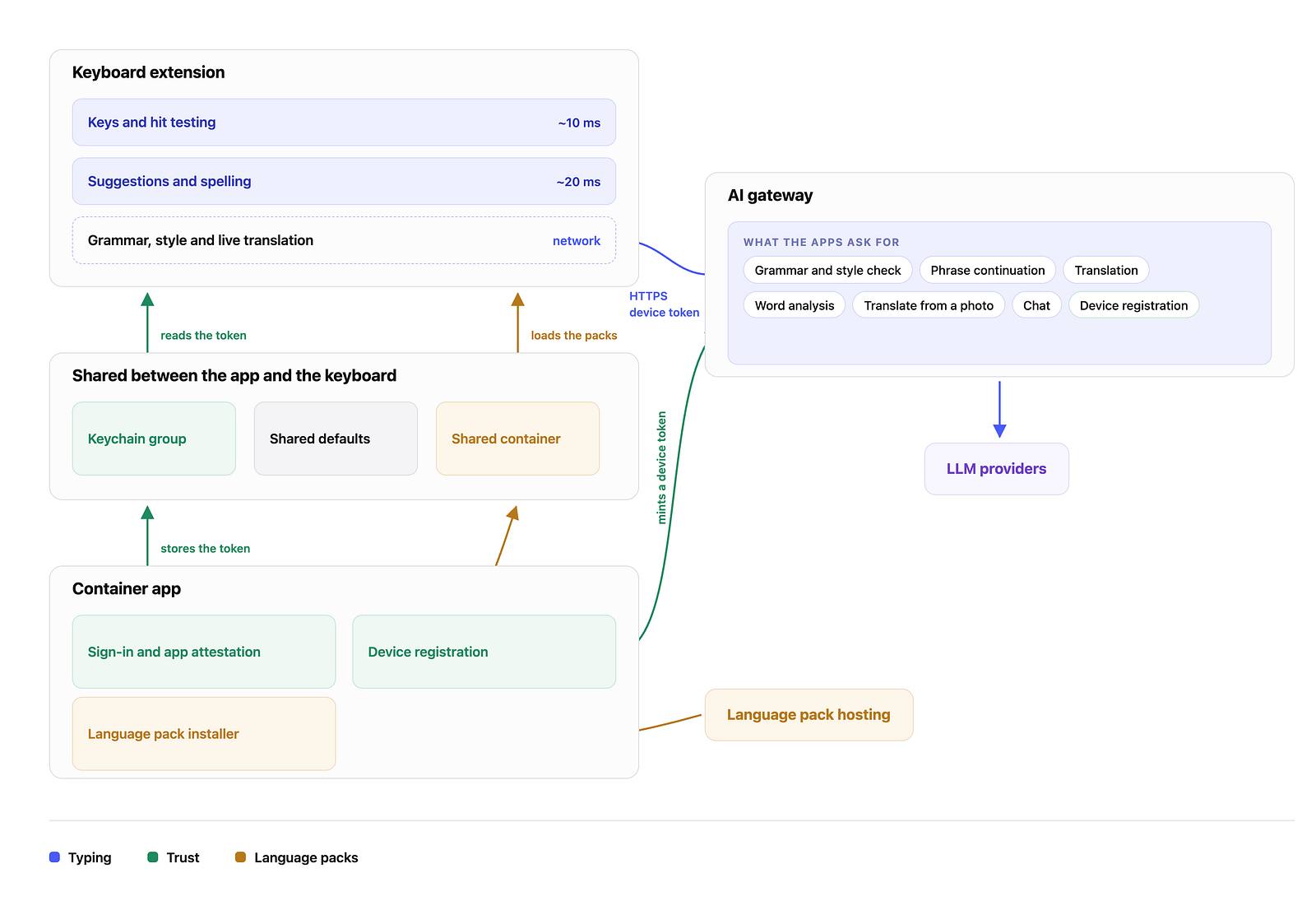
As soon as we remove the cloud from the local process, we can allow it to work for a few seconds.
A local checker underlines the suspicious word as soon as possible. In a few milliseconds (or seconds), the cloud LLM returns the answer as to whether the model agreed with the local checker or not, and the underlines quietly disappear if no needed.
Most other applications do it differently: they wait for the answer from the server and highlight the words after it. In this case, we ask the slowest component to decide the performance for the whole application.
No one argues with “likes” which highlight faster than the server gets any request
What is the best time to ask the server? That’s the question I asked myself at the start. After a few experiments, I understood: one short timer is bad due to spending a lot of tokens for a half-phrase and a long one makes the keyboard very lazy.
So, it made me land in a process where we have two timers: 400ms — when the text ends with .!? (sentence parsing) and 2 seconds — in other cases. The end of sentences is the cheapest signal to say that right now is the best moment to ask a cloud LLM, and it is the best moment when a user can accept the fix.
A local model helps find a “button” for you
Believe it or not, local models and predictions (re-ranking in my case) can help you make your keyboard easier to type on.
One of the issues for users who type fast is typos. I think you can name a lot of cases when you thought you pressed the button, but the symbol was wrong. Because in the extension you do your own layout, it is easy to move the buttons’ boundary, and not keys.
The model already predicts the next letter, so I move the boundary toward it by up to 7pt, which is almost 1/4 of a key about 33pt wide. The drawn keys never move, so nobody sees it happen, users just stop making typos often.
It is an additional key, that a good re-ranking model works better than a pure LLM because of its imagination.
You can’t draw in the field
This one changes the product, not just the code.
For iOS, the extension can insert and delete(backward). You can’t underline or highlight words, and you can’t ask where they are placed on the screen. Every red line you can see is created by the application, and not by the keyboard extension.
Unlike iOS, on Mac you can get the word position and highlight it.
That’s why all checks and highlights move to a tiny space above the keyboard buttons. I made chips “current -> correct” and added an additional expanded panel with explanations of the mistake.
Applying fixes then becomes a simple task. We need to move the cursor to the end of the word, remove N characters, insert the fix, and return the cursor back. Under it one rule lies, which I can argue about
If you don’t see the word where you expect it, just remove the suggestion. The missing fix is just a typo, but if you missed the position, you can cut part of the user’s text.
The information above gives us one more important point. In different programming languages, you can see various options to remove characters. Specifically for Swift, we can use deleteBackward() or proxy.adjustTextPosition(byCharacterOffset: utf16Offset)
The difference is that deleteBackward() removes one grapheme cluster — that’s what the user calls a symbol. adjustTextPosition() counts UTF-16. In both Latin and Cyrillic, the two counts match, and that’s the trap, because all test strings are made up of Latin and Cyrillic characters.
But add a single emoji, and the counters are off by one. Add another emoji and counts start being different even more. Basically, I had no idea that it was possible. And it’s lucky that the issue was caught during the tests.
Your tests know only what you wrote there.
The keyboard extension can’t say it is yours
If the keyboard goes to the paid backend, you have the task of authenticating the application. Of course, iOS has its own thoughts.
App Attest — it is Apple’s answer to the question “Is my app really talking to the server?”. But.. it doesn’t work in the keyboard extension. I wish someone had told me before I wrote the code and started the tests. Double work, because there are no lines in the documentation.
The first idea was to add an Auth SDK inside the extension. It fails twice: the SDK eats a big part of the available 60MB, and the checks will fail because it meets the same limitations as App Attest has. After some investigation, the plan was made:
- The app can prove itself. It has access to both full auth and app checks
- It issues a device token and stores it in the keychain group shared with the extension
- The keyboard sends only this token. It doesn’t know anything else and doesn’t store anything else
- The server stores only its SHA-256 hash, linked to the user, with rotation, a short grace period during rotation, and per-user limits
- Log out action kills the token immediately
It works on the fact that a valid token could appear in a valid application only.
Bottom Line
Working with keyboard extensions is like working with the whole system, don’t think that it is something small. In the end, you will have a big project that works by its own rules.
Unfortunately, even at Apple, not everything is covered by the documentation. I met many challenges and inconsistencies during this experiment. But at the same time, it was not boring and pushed all of us to the same investigations and research.